📜 In This Article
- What Does "Linking Aadhaar with Parivahan" Mean?
- Why Aadhaar Linking Matters in 2026
- Prerequisite — Aadhaar Must Have Active Mobile
- Method 1 — eKYC During DL Application (Sarathi)
- Method 2 — eKYC During RC/Vehicle Application (Vahan)
- Method 3 — Link Aadhaar to Existing DL
- Update Mobile Number on Sarathi (DL Portal)
- Update Mobile Number on Vahan (RC Portal)
- Benefits of Aadhaar eKYC — What Changes
- Faceless Services Unlocked by Aadhaar
- Troubleshooting — Common eKYC Errors
- Frequently Asked Questions
What Does "Linking Aadhaar with Parivahan" Mean?
There is a common misconception that Aadhaar linking with Parivahan is a single, separate process that needs to be done once. In reality, Aadhaar integration with Parivahan works in two distinct ways, and understanding both is essential.
Aadhaar eKYC During Applications
When you apply for a new DL, renew a DL, apply for RC services, or make changes to your documents on the Sarathi or Vahan portal, you can use Aadhaar authentication (eKYC) to verify your identity. This eliminates the need to physically visit the RTO — it enables the "faceless" service mode.
Aadhaar-Linked Mobile as OTP Channel
All OTP verifications across Sarathi, Vahan, mParivahan, and DigiLocker are sent to the mobile number linked to your Aadhaar. If your current number is different from your Aadhaar-registered number, you must update it — otherwise OTPs fail and you cannot access most online services.
Why Aadhaar Linking Matters in 2026
In 2026, Aadhaar-based eKYC has become the backbone of India's "Faceless Transport Services" initiative. MoRTH issued a nationwide advisory in January 2026 urging all vehicle owners and DL holders to ensure their Aadhaar-linked mobile number is updated on both the Vahan and Sarathi portals. Here is why this matters:
No RTO Visit Needed
Aadhaar eKYC enables "faceless" processing for most DL and RC services — you can complete the entire application from home.
No Photo Upload Needed
When you authenticate via Aadhaar, the portal fetches your photo directly from UIDAI — you only need to upload your signature.
Stops Fake DLs
Aadhaar eKYC ensures the person applying is the actual individual — preventing fake or duplicate licences from being issued.
Real-Time eChallan Alerts
Traffic challans, RC/DL expiry alerts, and service notifications are sent to your Aadhaar-linked mobile — keeping you informed.
DigiLocker Integration
Your DL and RC appear automatically in DigiLocker when your Aadhaar is linked — no separate fetching needed in most cases.
Faster Document Updates
Renewing, updating address, or changing details on your DL or RC is faster and smoother with Aadhaar eKYC pre-verified.
Prerequisite — Your Aadhaar Must Have an Active Mobile Number
Before you can use Aadhaar eKYC on the Parivahan portal, your Aadhaar must have an active, working mobile number linked to it. This is the mobile number that receives OTPs from UIDAI during the verification process.
Check if Your Aadhaar Has a Linked Mobile Number
-
1Go to myaadhaar.uidai.gov.in on your browser or phone.
-
2Click "Verify Aadhaar Number" and enter your 12-digit Aadhaar number and the captcha. This shows whether your Aadhaar is valid and active.
-
3To check or update your linked mobile number, click "My Aadhaar" → "Update Mobile Number." You can update your Aadhaar mobile number at any Aadhaar Seva Kendra or UIDAI-authorised centre.
What You Need for Parivahan Aadhaar eKYC
- 12-digit Aadhaar number — your UIDAI-issued Aadhaar card or e-Aadhaar number
- Active mobile number linked to Aadhaar — to receive the OTP from UIDAI
- Name and date of birth matching Aadhaar — details in the Parivahan application must exactly match your Aadhaar card
- Signature (scanned) — when using Aadhaar eKYC, your photo is fetched automatically from UIDAI; only the signature needs to be uploaded
Method 1 — Aadhaar eKYC During DL Application on Sarathi
This is the most common way Aadhaar is used with Parivahan — when applying for a new Learner's Licence, Permanent DL, DL renewal, or any DL-related service on the Sarathi portal.
-
1Go to sarathi.parivahan.gov.in and select your state from the dropdown.
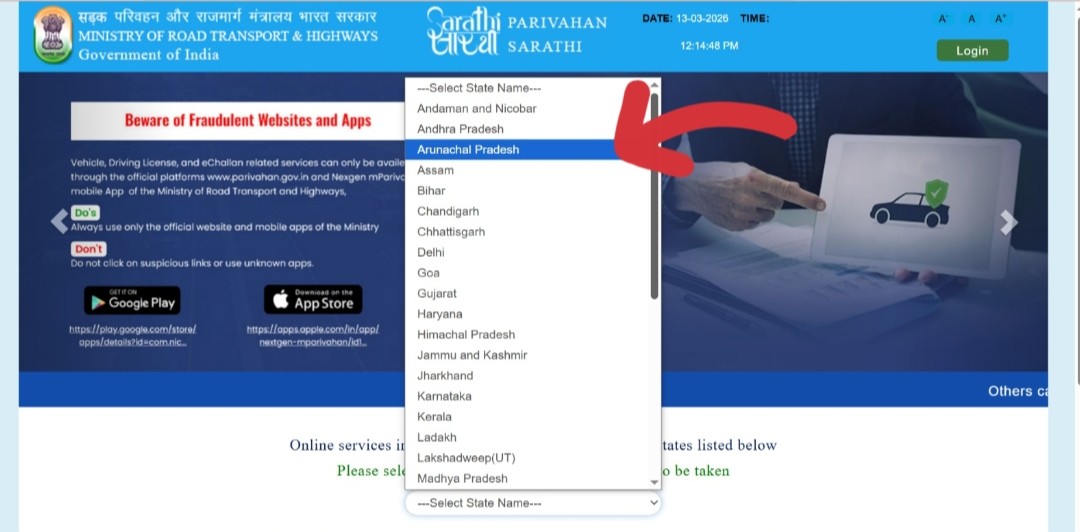 Visit sarathi.parivahan.gov.in and select your state
 -
2Select your service — "Learner's Licence," "Apply for DL," "DL Renewal," or whichever service you need. Click "Continue."
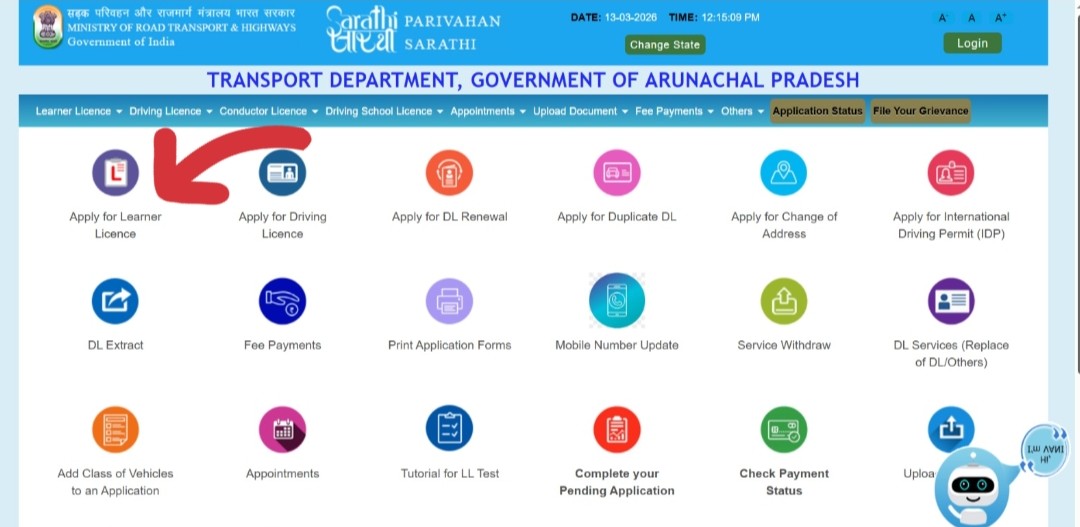 Select your DL service and click Continue
 -
3On the application form, you will see an option: "Submit via Aadhaar Authentication." Select this option.
-
4Enter your 12-digit Aadhaar number in the field provided. Read and accept the consent statement (you are consenting to the portal accessing your Aadhaar data from UIDAI).
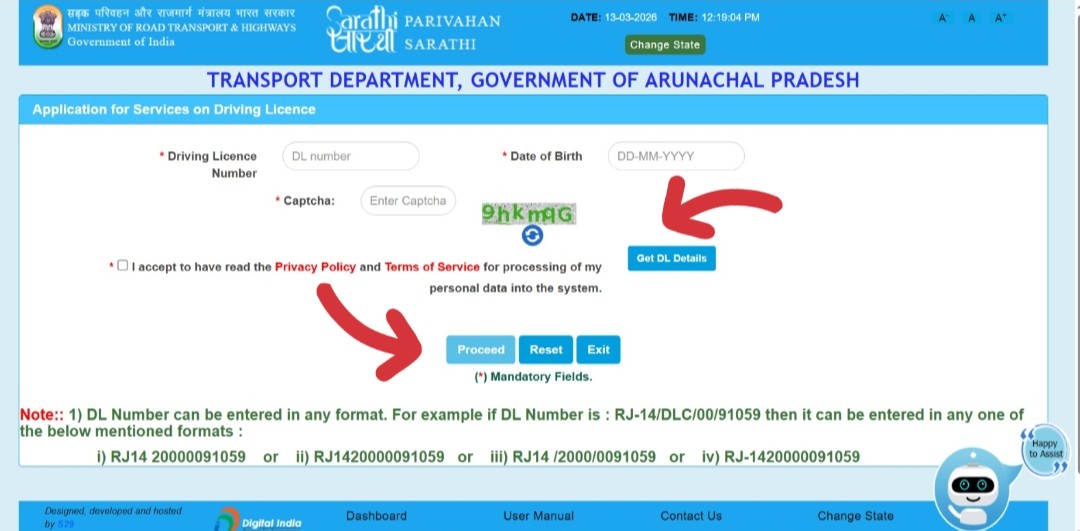 Enter your 12-digit Aadhaar number and accept the consent
 -
5Click "Send OTP." An OTP is sent to the mobile number linked to your Aadhaar (not necessarily your current number — it goes to the number registered with UIDAI).
-
6Enter the OTP and click "Verify." Upon successful verification:
- Your name, date of birth, address, and photograph are automatically fetched from the UIDAI database and pre-filled in the application form
- You do not need to upload a separate photo — it is pulled directly from Aadhaar
- Only your signature needs to be uploaded separately
-
7Review the pre-filled details, upload your signature, complete the remaining form fields, pay the fee, and submit. With Aadhaar eKYC, no RTO visit is required for document verification in most states — the application is processed digitally (faceless).
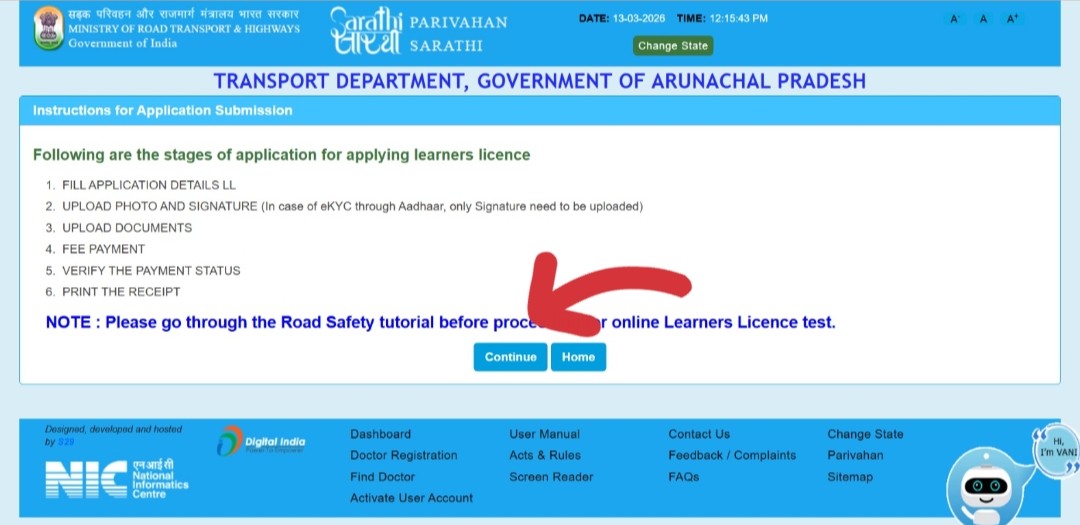 Review auto-filled details, upload signature, and submit application
Method 2 — Aadhaar eKYC During RC/Vehicle Services on Vahan
The Vahan portal similarly uses Aadhaar eKYC for vehicle-related services — ownership transfer, RC renewal, address change, hypothecation, and more.
-
1Go to vahan.parivahan.gov.in/vahanservice/vahan/ and enter your vehicle registration number. Click "Proceed."
-
2Log in or register with your mobile number (OTP verification). Select the service you need from the Vahan Citizen Services page.
-
3Enter the last 5 digits of chassis number and click "Validate." Click "Generate OTP" — the OTP goes to the Aadhaar-linked mobile number registered with your vehicle.
-
4Enter the OTP to proceed. For services that support Aadhaar eKYC, you will see an "Aadhaar Authentication" option. Enter your Aadhaar number and complete the OTP verification from UIDAI.
-
5With successful Aadhaar verification, your identity is confirmed and the application proceeds in faceless mode — document upload is simplified and in many cases, RTO appointment is not required.
Method 3 — Link Aadhaar to Your Existing Driving Licence
If you already have a Permanent Driving Licence and want to link your Aadhaar to it (to enable digital DL features and faceless services), you can do this through the Sarathi portal.
-
1Go to sarathi.parivahan.gov.in and select your state.
-
2Click on "Driving Licence" in the top menu → "Services on Driving Licence."
-
3Enter your DL number and date of birth to fetch your licence details. An OTP will be sent to the mobile registered with your DL.
-
4From the list of available services, look for "Aadhaar Seeding" or "Link Aadhaar with DL" (availability varies by state). If shown, select it.
-
5Enter your 12-digit Aadhaar number and consent to UIDAI data sharing. An OTP is sent to your Aadhaar-linked mobile. Enter the OTP to complete the linking.
-
6Linking is confirmed. Your DL record in the Sarathi database is now associated with your Aadhaar number — enabling all Aadhaar-based faceless services for future applications.
Update Mobile Number on Sarathi (Driving Licence Portal)
If the mobile number registered with your DL on the Sarathi portal is outdated or different from your current number, you must update it. This is critical — all OTPs for DL-related services go to this number.
-
1Go to sarathi.parivahan.gov.in and select your state.
-
2On the Sarathi dashboard, click "Others" in the top navigation menu and select "Mobile Number Update."
-
3Enter your Driving Licence number (15 or 16 digits, in the format shown on your DL card) or your LL application number. Enter your date of birth.
-
4The system will send an OTP to the Aadhaar-linked mobile number for identity verification. Enter the OTP received. This is why your Aadhaar mobile number must be active — it serves as the "trust anchor" for updating the DL-linked number.
-
5Enter your new mobile number and confirm it. Click "Update."
-
6An OTP is sent to the new mobile number to verify it is active and belongs to you. Enter this OTP and click "Submit."
-
7The update is confirmed. You receive a success message. The new number is typically active for OTPs within minutes — though in some states it may take 24–48 hours to fully reflect.
Update Mobile Number on Vahan (Vehicle RC Portal)
The mobile number registered with your vehicle's RC on the Vahan portal is separate from the Sarathi DL mobile number. Update it independently to ensure all RC-related OTPs and challan alerts are delivered correctly.
-
1Go to vahan.parivahan.gov.in/vahanservice/vahan/ and enter your vehicle registration number. Click "Proceed."
-
2Log in or register. Click "Other Services" from the Vahan Citizen Services page and select "Update User Mobile No."
-
3Enter your vehicle registration number and the previous registered mobile number (the old number currently linked). Click "Generate OTP."
-
4Enter the OTP received on the old number. If you no longer have access to the old number, you will need to use the Aadhaar-based alternative — enter the registered owner's name as per Aadhaar and the mobile number registered with Aadhaar for verification instead.
-
5Enter the new mobile number and click "UPDATE." An OTP is sent to the new number to confirm it is active. Enter the OTP to complete the update.
-
6Update successful. Note the Application Reference Number (ARN) from the success screen. The new mobile number is typically active within minutes to 24 hours.
Benefits of Aadhaar eKYC — What Changes After Linking
| Feature | Without Aadhaar eKYC | With Aadhaar eKYC |
|---|---|---|
| LL application | Upload photo + signature + all documents, RTO visit for verification | ✅ Only signature upload; photo auto-fetched; no RTO visit in most states |
| LL test | Must visit RTO in most states | ✅ Take test from home online (most states) |
| DL renewal | Upload documents, possible RTO visit | ✅ Faceless renewal in most states |
| DL address change | Submit documents at RTO or online with uploads | ✅ Instant update with Aadhaar eKYC |
| Photo verification | Upload passport photo separately | ✅ Photo pulled directly from UIDAI Aadhaar database |
| Duplicate DL | FIR + documents + RTO | ✅ Mostly faceless with Aadhaar eKYC |
| Challan alerts | May miss SMS if number is outdated | ✅ Real-time SMS to updated Aadhaar-linked mobile |
| DigiLocker DL | Manual fetching with DL number and DOB | ✅ Auto-populated when Aadhaar is linked |
Faceless Services Unlocked by Aadhaar eKYC
MoRTH's "Faceless Services" initiative means you can complete these services entirely online — without stepping into an RTO — when you authenticate with Aadhaar:
Sarathi — Driving Licence Faceless Services
- Apply for Learner's Licence — including online LL test from home
- Convert LL to Permanent DL (practical test at RTO still required)
- Renewal of DL (below age 40 and non-commercial)
- Duplicate DL application
- Change of address on DL
- Addition of vehicle class (after obtaining new LL)
- Update photo/signature on DL
- Apply for International Driving Permit (IDP)
Vahan — Vehicle RC Faceless Services
- Hypothecation addition, continuation, and termination
- Change of address on RC
- Duplicate RC application
- Transfer of ownership (in supported states)
- Update insurance and PUC details
Troubleshooting — Common Aadhaar eKYC Errors on Parivahan
The OTP is sent to the mobile number registered with your Aadhaar at UIDAI — not necessarily your current number. If your Aadhaar has an old or inactive number, the OTP goes nowhere.
The name or date of birth in your Parivahan application does not exactly match what is recorded in your Aadhaar. Even a single character difference (e.g., "Mohammed" vs "Mohammad") causes a mismatch failure.
eSign (the digital signature using Aadhaar OTP) sometimes fails due to browser compatibility issues, pop-up blockers, or portal timeouts.
Your Aadhaar number is already associated with a different DL in the Sarathi database — possibly a duplicate or an old DL from a different state.
The system sends an OTP to the old mobile number for verification, but you no longer have that SIM.
Frequently Asked Questions
It is not legally mandatory to link Aadhaar with your existing DL or RC in isolation. However, Aadhaar eKYC is required if you want to use faceless (online-only) services. If you do not use Aadhaar eKYC, you can still access all Parivahan services — but you will need to visit the RTO in person for document verification on most applications.
No. Aadhaar eKYC follows a strict consent-based framework under UIDAI guidelines. Parivahan only receives the specific data it requests — typically your name, date of birth, address, and photograph. You must explicitly consent before any data sharing. UIDAI does not share your biometric data (fingerprints, iris) with Parivahan.
For Parivahan applications, the address fetched from Aadhaar is used to pre-fill the form. If your current address is different, you can update it in the application form manually before submitting. Alternatively, you can update your Aadhaar address first at myaadhaar.uidai.gov.in for complete consistency across documents.
mParivahan uses your Aadhaar-linked mobile number for OTP-based login and document verification. You cannot enter your Aadhaar number directly in the mParivahan app to "link" it — the linking happens when you use Aadhaar eKYC on the Sarathi or Vahan web portals. The mParivahan app benefits automatically from properly linked Aadhaar details.
Older paper-format DLs issued before the Sarathi digitisation era may not be in the national database. In this case, you need to visit your RTO to get the DL migrated into the Sarathi system. Once migrated, you can then perform Aadhaar eKYC for future services. The RTO usually completes migration within 3–7 working days.
Aadhaar eKYC requires an OTP sent to your Aadhaar-registered mobile number. Without access to your phone and number, no one can complete the authentication. Additionally, from 2026, MoRTH has implemented duplicate DL detection that flags if the same Aadhaar is used for more than one DL application — preventing fraudulent parallel applications.
There may be a 24–48 hour sync delay between the portal's database and the SMS gateway. Wait one full day after the update confirmation and retry. If OTPs still go to the old number after 48 hours, contact helpdesk-sarathi@gov.in (for DL) or helpdesk-vahan@gov.in (for RC) with your application reference number and the mobile update confirmation.
No. Aadhaar eKYC authentication itself is free on the Parivahan portal. The only fees that apply are the standard Parivahan service fees for the specific application you are making (e.g., DL application fee, renewal fee) — these fees exist regardless of whether you use Aadhaar eKYC or not.