Parivahan Sewa Portal
If you have ever tried to get a driving licence or renew a vehicle registration in India, you probably remember the experience well — arriving at the Regional Transport Office (RTO) early in the morning, only to find a queue that stretched around the building. Hours of waiting, stacks of paperwork, and multiple visits that each ate into your working day. For millions of Indian citizens, this used to be the only way to deal with transport-related administration.
That reality has changed dramatically. Parivahan Sewa, the official digital platform launched by the Ministry of Road Transport and Highways (MoRTH), Government of India, has placed every major transport service online. Whether you are applying for your very first learner's licence, upgrading to a permanent driving licence, renewing one that is about to expire, or replacing a licence that was lost or damaged, you can now do all of it from your home, on your phone or computer, at any time of day.
Accessible at parivahan.gov.in, the portal connects more than 1,300 RTOs across all states and Union Territories into a single, unified system. With nearly 23 crore vehicle records and 11 crore licence records, it is one of the largest transport databases in the world.
Quick Application Status Check
Track your application status or check your license and vehicle details instantly.
License Related Services
Services like booking, renewal, status check, and verification for learner or driving licenses.




Vehicle Related Services
All vehicle related registration, tax, permit and certificate services.


All Guides & Articles
1. Driving Licence Guides
2. Vehicle Registration & RC
3. eChallan & Traffic Fines
4. mParivahan & Digital Documents
What is Parivahan Sewa?
Parivahan Sewa is the Government of India's official online portal for all vehicle and driving licence services. It was developed by the Ministry of Road Transport and Highways to reduce paperwork, eliminate long queues at RTOs, and make essential transport services accessible to every citizen regardless of where they live.
At its core, the Parivahan Sewa ecosystem is built around two flagship portals.
Vahan — Vehicle Registration Services
Vahan handles everything related to motor vehicles — new registrations, ownership transfers, RC renewals, road tax payments, fitness certificates, permits, and hypothecation entries. Any service that relates to the vehicle itself falls under Vahan.
Sarathi — Driving Licence Services
Sarathi manages all driving licence functions — learner's licences, permanent DL applications, renewals, duplicate licences, address updates, driving test slot booking, and digital DL downloads. If it involves the person behind the wheel, it is handled by Sarathi at sarathi.parivahan.gov.in.
| Category | Description |
|---|---|
| Portal name | Parivahan Sewa – official online transport platform at parivahan.gov.in |
| Driving Licence (Sarathi) | Applications, renewals, duplicates, test slot booking, digital DL download |
| Vehicle Registration (Vahan) | New registration, ownership transfer, RC renewal, vehicle details check |
| Traffic & Finance | eChallan payment, road tax, permits, PUC and fitness certificates |
| Digital Integration | mParivahan app — legally valid digital DL and RC on your smartphone |
| Official website | https://parivahan.gov.in |
Key Features of Parivahan Sewa
Centralised National Database: All 1,300+ RTOs across India are connected to a single system. Your records are accessible regardless of which state your licence was issued in.
Online Applications and Payments: Apply, upload documents, and pay fees via UPI, debit cards, credit cards, or net banking. No cash transactions or physical submissions needed for most services.
Real-Time Application Tracking: After submission, track your application status any time using your reference number.
Legally Valid Digital Documents: DL and RC stored on mParivahan or DigiLocker are legally valid under the Motor Vehicles Act and accepted by traffic police nationwide.
Appointment Booking: Book specific RTO test slots online to avoid walk-in queues.
eChallan Management: Check and pay traffic challans online. Receive real-time notifications when a challan is issued against your vehicle.
The Two Main Licences: Learner's and Permanent
Getting a driving licence in India is a two-stage journey. The law requires every new driver to first obtain a Learner's Licence, gain supervised driving experience, and only then qualify for a Permanent Driving Licence.
1. Learner's Licence (LL)
A Learner's Licence is the first official permit issued to a person learning to drive. While holding an LL, you may drive only when accompanied by a person who holds a valid Permanent Driving Licence. You must display an "L" sign on the front and rear of the vehicle at all times.
Key facts: Valid for 6 months from the date of issue. Cannot be renewed after expiry. You must apply for your Permanent DL within 180 days (6 months) of obtaining your LL, and you must have held the LL for a minimum of 30 days before applying.
Eligibility for a Learner's Licence
- Minimum age of 16 years for non-geared motorcycles up to 50cc (parental consent required)
- Minimum age of 18 years for cars, geared motorcycles, and all other non-commercial vehicles
- Minimum age of 20 years for commercial or transport vehicles
- Basic knowledge of traffic rules, road signs, and road safety regulations
Documents Required for a Learner's Licence
- Proof of Age: Birth Certificate, Class 10th Mark Sheet, PAN Card, Passport, or Aadhaar Card
- Proof of Address: Aadhaar Card, Passport, Voter ID Card, Electricity or Gas Bill, Ration Card, or Rental Agreement
- Recent passport-sized photographs
- Form 1 (Self-declaration of physical fitness)
- Application fee payment receipt
2. Permanent Driving Licence (DL)
The Permanent Driving Licence is the full, independent driving authorisation issued by the RTO. It allows you to drive anywhere in India without supervision. Validity: before age 30 — valid until age 40; between 30 and 50 — valid for 10 years; after 50 — valid for 5 years. Commercial licences: 3 to 5 years.
Eligibility for a Permanent Driving Licence
- Must hold a valid Learner's Licence for the same vehicle category
- Must have held the LL for a minimum of 30 days
- Must apply within 180 days of obtaining the LL
- Must pass the practical driving skills test at the RTO
- Form 1A (medical certificate) required for applicants above 40 or commercial licence applicants
How to Apply for a Driving Licence
Step 1: Apply for a Learner's Licence
-
1Open your browser and visit the official Sarathi portal at sarathi.parivahan.gov.in.
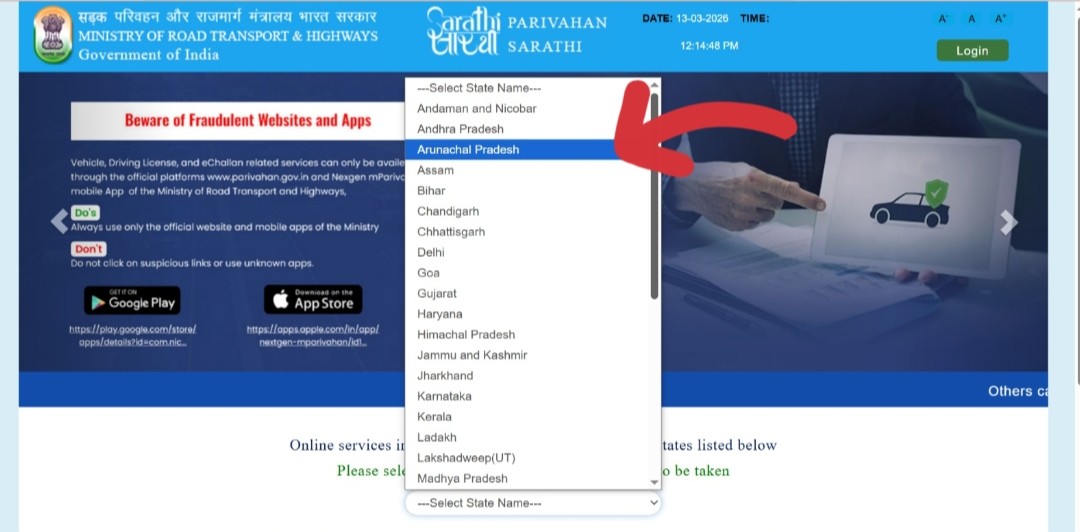 Sarathi portal homepage — select your state from the dropdown list
 -
2Select your state from the dropdown list. You will be taken to your state's transport department page.
-
3Click on the "Learner's Licence" menu and select "Application for New Learner's Licence."
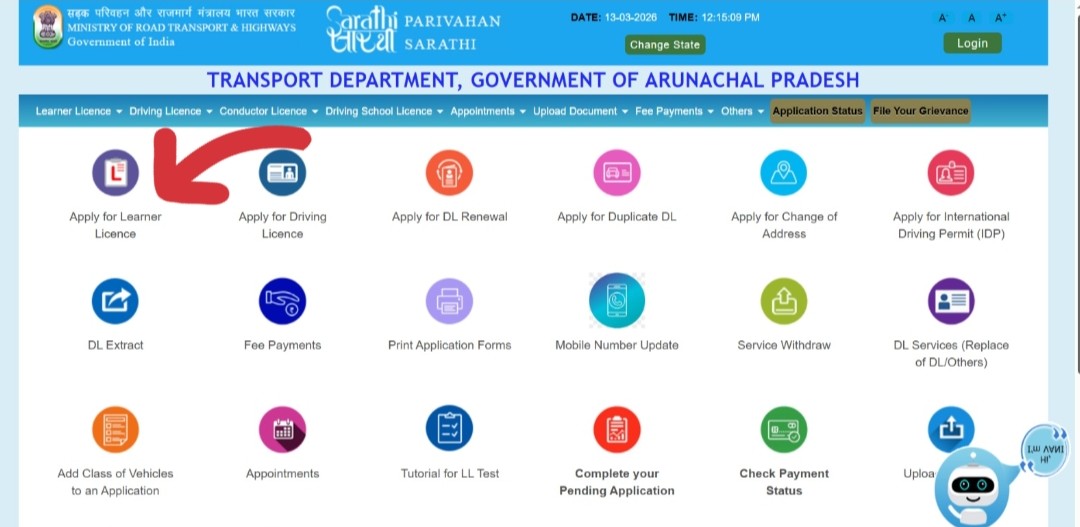 Click Learner's Licence → Application for New Learner's Licence
 -
4Read the instructions carefully, then click "Continue" to proceed to the application form.
-
5Fill in Form 2 with your personal details — full name, date of birth, address, and the vehicle class you are applying for (motorcycle, car, etc.).
-
6Upload scanned copies of your proof of age, proof of address, a recent passport-sized photograph, and your signature.
-
7Complete and submit Form 1 (Self-declaration of physical fitness).
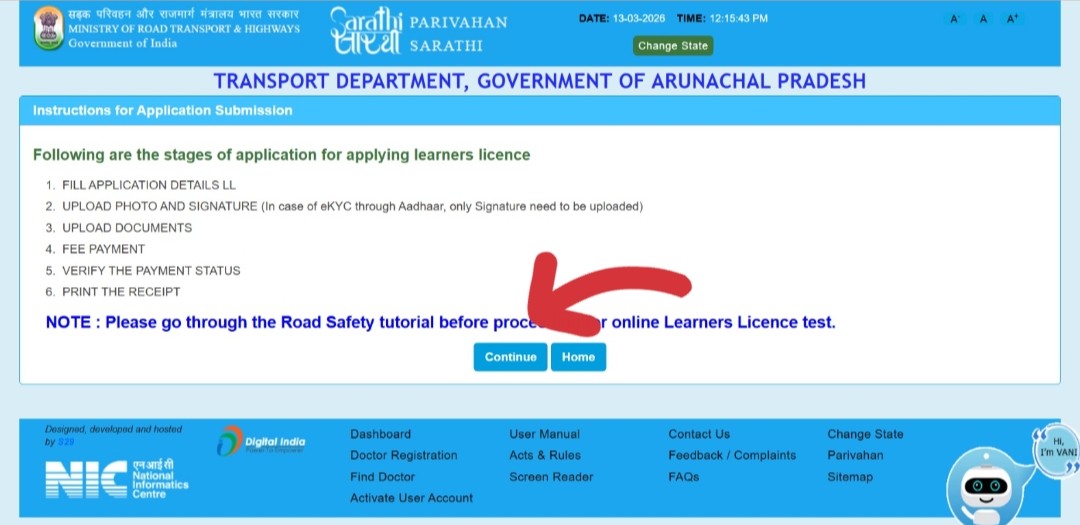 Review all details, then submit your application
 -
8Pay the Learner's Licence application fee online via UPI, net banking, debit card, or credit card. Save the payment receipt.
-
9Book your LL test slot. In most states, the test is now conducted online with multiple-choice questions on traffic rules, road signs, and road safety.
-
10Upon passing the test, download your digital Learner's Licence from the portal immediately. The physical LL will be dispatched to your address by post.
Step 2: Apply for a Permanent Driving Licence
After holding your LL for at least 30 days, apply for your Permanent DL. You must do this before your LL expires at the 180-day mark.
-
1Visit parivahan.gov.in and click on "Driving Licence Related Services."
-
2Select your state from the dropdown menu. You will be taken to the Sarathi portal for your state.
-
3Click "Apply for Driving Licence" and then select "Holding a Learner's Licence" as the licence type.
-
4Enter your Learner's Licence number, date of birth, and the captcha code. An OTP will be sent to your registered mobile number. Enter the OTP to verify your identity.
-
5Complete Form 4 and upload required documents: LL copy, proof of age, proof of address, Form 1, passport photograph, and digital signature. Applicants above 40 or commercial DL applicants must also upload Form 1A (medical certificate).
-
6Pay the Permanent DL application fee of Rs. 200 online. Save the payment receipt.
-
7Book your practical driving test slot at your nearest RTO. Select a convenient date and time from the available options.
-
8Visit the RTO on the scheduled date with all original documents and the vehicle for the test. A Motor Vehicle Inspector will conduct the practical driving test.
-
9Upon passing the practical test, your Permanent Driving Licence will be issued. Download a digital copy from the portal immediately. The physical DL will be dispatched by post.
Renewing Your Driving Licence
Driving with an expired licence is illegal under the Motor Vehicles Act. The renewal process through Parivahan Sewa is much simpler than the original application. For applicants below 40 without a commercial licence, the entire process can be completed online without visiting the RTO.
Key Renewal Timelines
- You can begin renewal up to one year before your licence expires.
- Within 30 days of expiry: Renewed licence takes effect from the original expiry date. No late fee charged.
- After 30 days of expiry: Late fee of Rs. 30 per year of delay. Renewed licence takes effect from date of application.
- Expired more than 5 years: Renewal not possible — you must apply for a fresh licence from the beginning.
Step-by-Step Renewal Process
-
1Visit parivahan.gov.in and click on "Driving Licence Related Services."
-
2Select your state from the dropdown menu.
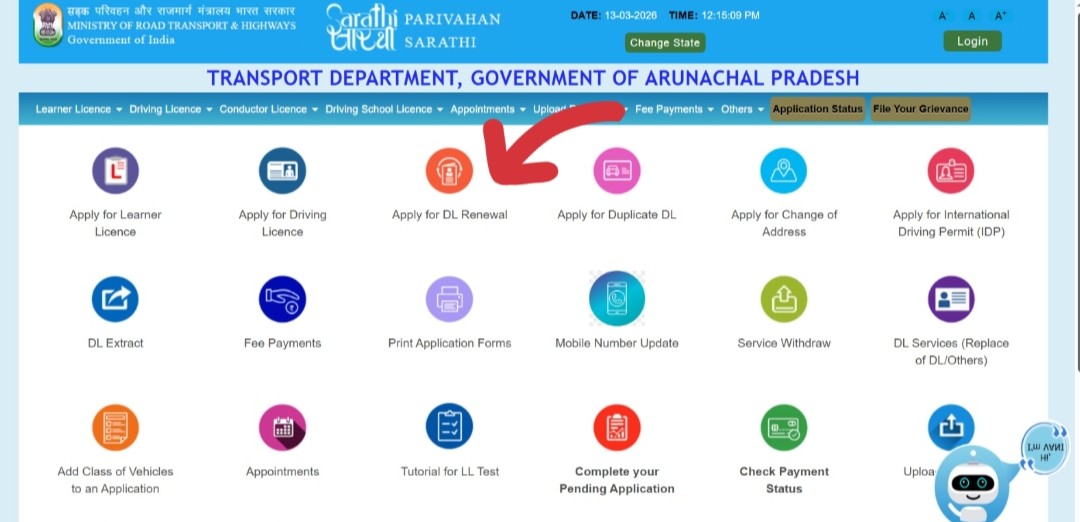 Select your state on the Sarathi portal to begin DL renewal
 -
3Click on "Apply for DL Renewal" from the Driving Licence menu.
-
4Enter your driving licence number, date of birth, and captcha code, then click "Proceed."
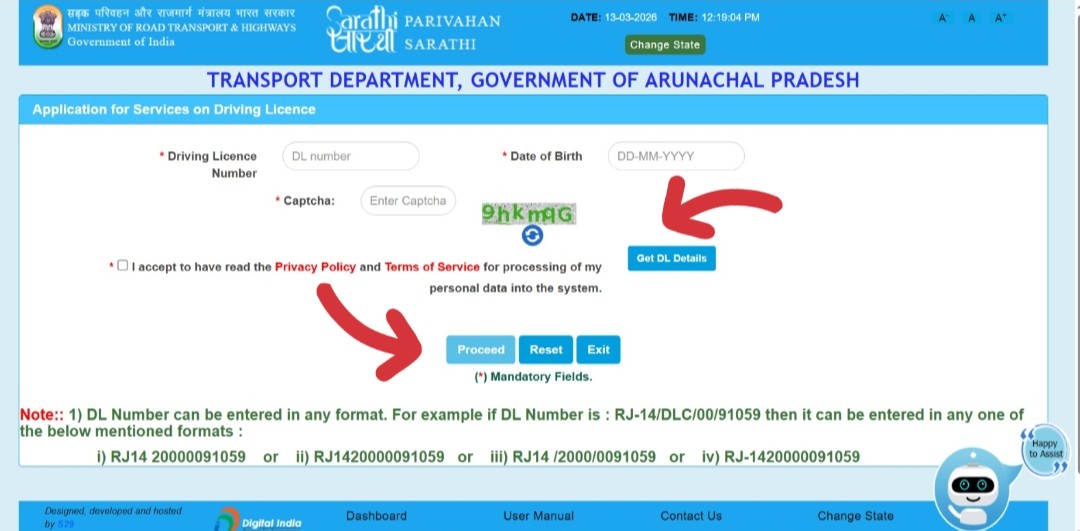 Enter your DL number and date of birth, then click Proceed
 -
5Verify your details on screen and fill in the required fields in the online renewal form.
-
6Upload scanned copies of your existing DL, proof of age, and proof of address. Add Form 1A (medical certificate) if you are above 40 or hold a commercial DL.
-
7Pay the renewal fee online (typically Rs. 200–300, varying by state). Save your application receipt.
-
8If your state requires a biometric update or medical check, book an RTO appointment slot and visit on the scheduled date.
-
9Once processed, your renewed DL will be dispatched by post. Download the digital version from the portal once issued.
Duplicate Driving Licence
Losing your driving licence can cause immediate problems. Fortunately, Parivahan Sewa lets you apply for a duplicate entirely online.
When Do You Need a Duplicate?
- Original licence is lost or stolen
- Physical card is damaged, mutilated, or no longer legible
- Photograph on the licence is outdated or unclear
- Licence was destroyed in an accident, fire, or flood
First Step: File an FIR
If your licence is lost or stolen, file a First Information Report (FIR) at your nearest police station before approaching the Parivahan portal. State clearly that your driving licence was lost or stolen and include your licence number. The FIR is a mandatory document for the duplicate application and protects you legally if the original is misused. Keep multiple copies of the FIR acknowledgment.
Documents Required for a Duplicate Licence
- FIR copy from the police (mandatory for loss or theft)
- Form LLD (Intimation of Loss/Damage) — available on the Sarathi portal
- Proof of identity and address (Aadhaar, Passport, or Voter ID)
- Recent passport-sized photographs
- Application fee receipt
- Affidavit on non-judicial stamp paper (if required by your state)
The mParivahan App
The mParivahan mobile application (available for Android and iOS) lets you store legally valid digital copies of your DL and RC on your smartphone. These are accepted by traffic police nationwide under the Motor Vehicles Act.
Through mParivahan you can check any vehicle's details by registration number, view and pay outstanding challans, access your licence information, and receive real-time challan notifications. It also integrates with DigiLocker for a second legally verified copy of your DL.
Benefits of Using Parivahan Sewa
Convenience: Services available 24/7. Apply, pay, or check status at any time.
Time Savings: What once took multiple RTO visits over days can now be done in a single online session. Only the practical driving test requires a physical visit.
Transparency: Fees are fixed and publicly displayed. Application status is visible in real time, reducing corruption.
Reduced Paperwork: Digital uploads replace multiple physical copies for most services.
National Integration: All RTOs are connected. Your records follow you wherever you move in India.
Accessibility: Citizens in remote areas can access most services from any internet connection.
Contact Details
| Problem Area | Official Email ID |
|---|---|
| Vehicle Registration, Tax, Permits | helpdesk-vahan@gov.in |
| Driving Licence, Learner's Licence | helpdesk-sarathi@gov.in |
| mParivahan App Related Issues | helpdesk-mparivahan@gov.in |
| eChallan Related Issues | helpdesk-echallan@gov.in |
| General Technical Problems | wim.rth@nic.in |
Frequently Asked Questions
10 QuestionsConclusion
Parivahan Sewa represents one of the most successful implementations of digital governance in India. By bringing the full spectrum of transport services online, the platform has saved millions of citizens countless hours and eliminated much of the frustration that once defined interactions with transport administration.
The key things to remember: always apply for your Permanent DL within 180 days of your LL. Renew before expiry to avoid late fees and legal issues. In case of loss, file an FIR first and then apply for a duplicate online. Keep the mParivahan app installed so your documents are always with you.
Our Sources & Editorial Standards
Every guide on ParivahanSewan.net is researched against official government sources and tested on live portals before publication.
Official Government Portals
- parivahan.gov.in — MoRTH official portal
- sarathi.parivahan.gov.in — DL services
- vahan.parivahan.gov.in — Vehicle services
- echallan.parivahan.gov.in — eChallan
- digilocker.gov.in — Digital documents
Laws & Regulations Referenced
- Motor Vehicles Act, 1988
- Central Motor Vehicles Rules, 1989
- MoRTH Circulars & Notifications
- Supreme Court directives on road safety
- RBI guidelines on vehicle loan NOCs
Our Editorial Process
- Every step tested on live Sarathi & Vahan portals
- Fees and forms verified against official RTO data
- Articles reviewed and updated regularly
- No sponsored content or paid promotions
- Independent — not affiliated with MoRTH