📜 In This Article
- What is Addition of Vehicle Class?
- Which Categories Can You Add?
- Eligibility Requirements
- Documents Required
- Step 1 — Apply for LL for New Class
- Step 2 — Apply via Services on DL
- Step 3 — Book and Pass the Driving Test
- Fees Breakdown
- How Long Does It Take?
- Common Errors and Fixes
- Frequently Asked Questions
What is Addition of Vehicle Class?
When your Driving Licence was issued, it was authorised for one or more specific classes of vehicle — for example, MCWG (motorcycle with gear) or LMV (light motor vehicle like a car). If you want to legally drive a vehicle class that is not listed on your existing DL, you need to apply for the Addition of Vehicle Class — also called an Endorsement or AEDL (Additional Endorsement on Driving Licence).
Common real-life examples include:
- You have a two-wheeler licence and have now bought a car — need to add LMV
- You have a car licence and want to ride a motorcycle — need to add MCWG
- You want to drive a commercial vehicle like a taxi, truck, or bus — need to add a Transport Vehicle class
- You hold an LMV licence and want to drive a medium goods vehicle — need to add MGMV or HMV
Which Categories Can You Add?
India's Motor Vehicles Act recognises several vehicle classes. Here are the most common ones you can add to an existing DL:
Light Motor Vehicle
LMV / LMV-NTCars, jeeps, SUVs, and vans with GVW up to 7,500 kg. Most commonly added by motorcycle licence holders who buy a car.
Motorcycle With Gear
MCWGAll geared motorcycles and scooters. Added by car licence holders who want to legally ride a motorcycle.
Medium / Heavy Goods
MGMV / HMV / HGMVTrucks, lorries, and goods vehicles above 7,500 kg. Requires prior LMV licence and minimum age of 20 years.
Transport Vehicle
LMV-TR / HPMV / HTVTaxis, buses, auto-rickshaws for hire. Requires minimum age of 20, medical certificate, and LMV licence held for 1 year.
Non-Geared Two-Wheeler
MC EX50CC / MCWOGGearless scooters and mopeds. Minimum age 16. Usually already covered by MCWG, but separate class for those who want only gearless.
Light Passenger Vehicle
LMV-TRTaxis, cabs, and light transport vehicles for hire. Requires existing LMV licence and commercial endorsement.
E-Rickshaw / E-Cart
E-RICKSHAW / E-CARTElectric three-wheelers. Separate class added in 2018. Minimum age 18. Simpler test process in most states.
Eligibility Requirements
Before starting the process, confirm you meet these requirements:
- Valid Permanent Driving Licence — your existing DL must not be expired or suspended. If it is expired, renew it first.
- Valid Learner's Licence for the new class — you must first obtain an LL for the vehicle class you want to add. This is mandatory before applying for the addition.
- Minimum age of 18 years for non-transport vehicles (LMV, MCWG). Minimum age of 20 years for commercial/transport vehicles in most states.
- For Transport Vehicle class: You must already hold an LMV licence for at least 1 year before applying to add a transport vehicle class.
- Medical fitness: Form 1 (self-declaration) for all. Form 1A (doctor's certificate) required if you are above 40 or adding a transport/commercial vehicle class.
- No disqualification: Your licence must not be under any court-ordered disqualification or suspension.
Documents Required
Keep all these documents ready before you start the application on the Sarathi portal:
Required for All Additions
- Existing Driving Licence — original or digital copy (mParivahan/DigiLocker)
- Valid Learner's Licence — for the new vehicle class you want to add
- Form 1 — Self-declaration of physical fitness (downloadable from Sarathi)
- Proof of Identity — Aadhaar Card, Passport, Voter ID, or PAN Card
- Proof of Address — Aadhaar, Passport, Voter ID, or recent utility bill
- Recent passport-sized photograph — as per portal specifications
- Application fee receipt — after online payment
Additional — Transport/Commercial Class
- Form 1A — Medical certificate signed by a registered doctor (mandatory for above 40 or transport class)
- Proof that existing LMV licence is 1+ year old — required for commercial vehicle class addition
- NOC from employer (if applying for HTV/PSV in some states)
- Affidavit / Driving School Certificate — some states require proof of training
Step 1 — Apply for a Learner's Licence for the New Vehicle Class
Before you can add a new class to your DL, you must first obtain a Learner's Licence for that class. Even though you already hold a permanent DL, the law requires an LL for the new category. The good news: if you already hold a DL, you are exempt from the knowledge test when applying for an LL for the new class.
-
1Go to sarathi.parivahan.gov.in and select your state from the dropdown.
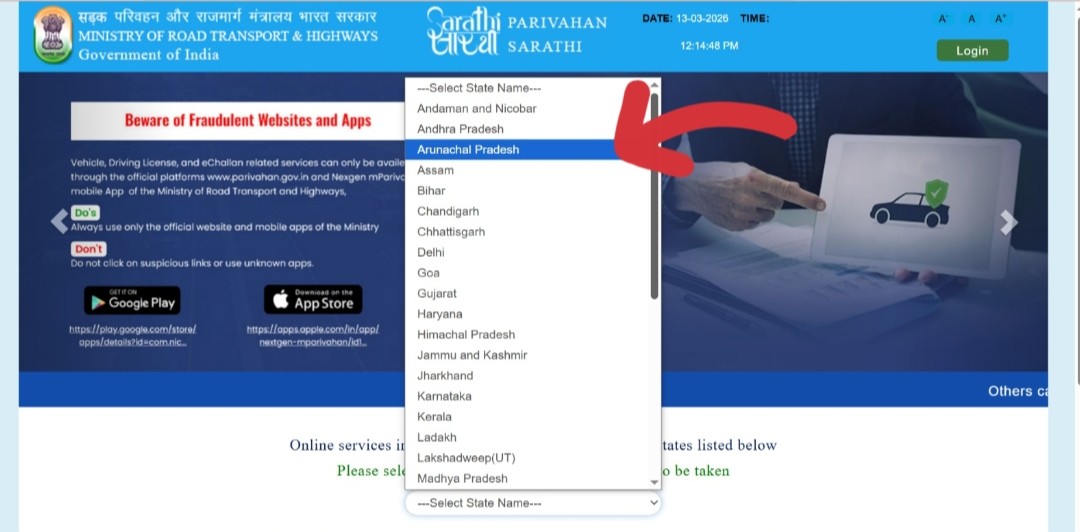 Visit sarathi.parivahan.gov.in and select the state where your DL was issued
 -
2Click on "Learner Licence" in the top menu of the Sarathi state dashboard, then select "Application for New Learner's Licence."
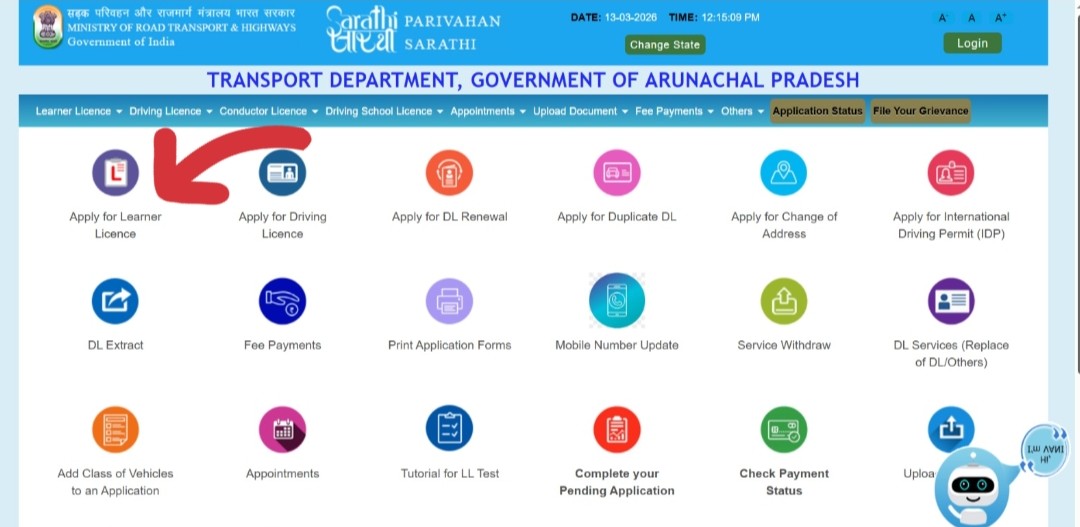 Click Learner Licence → Application for New Learner's Licence
 -
3On the application type screen, select "Applicant holds Driving Licence — Enter DL Number." This is the key step that tells the portal you already have a DL.
-
4Enter your existing Driving Licence number and Date of Birth, then click Submit. The portal will display your current DL details and the vehicle classes already on your licence.
-
5Verify your details are correct. The application form will be auto-filled with your personal information from the DL records. Update any outdated details (address, mobile number) if needed.
-
6Select the new vehicle class you want to add (e.g., LMV, MCWG, HMV, Transport Vehicle) from the vehicle class dropdown.
-
7Upload the required documents — existing DL, Form 1, proof of identity, proof of address, passport photograph, and Form 1A if applicable.
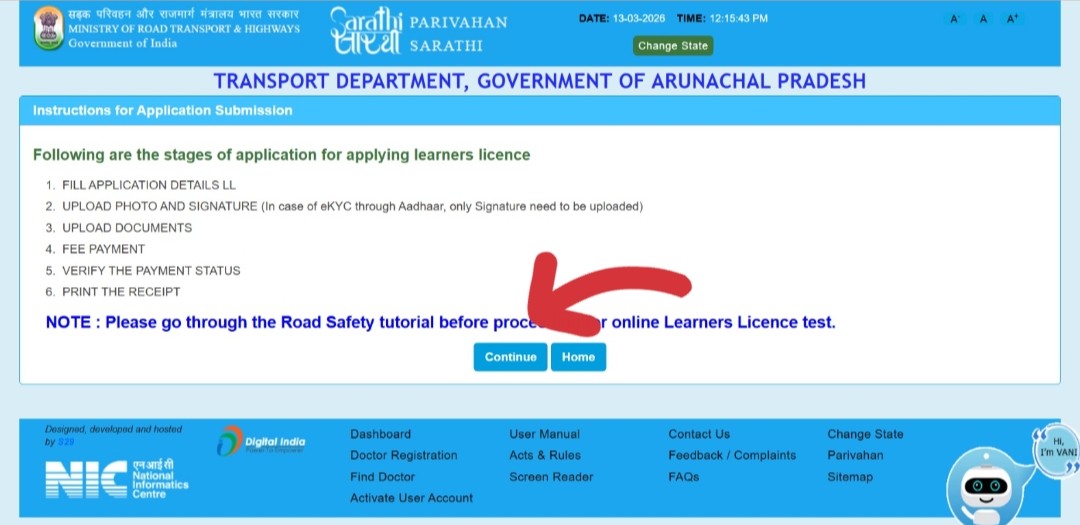 Upload documents and submit your Learner's Licence application
 -
8Pay the Learner's Licence application fee online (approximately ₹200–₹300 including LL issuance fee). Save the payment receipt.
-
9Since you already hold a DL, you are exempted from the LL knowledge test in most states. Your LL will be issued directly after document verification. Download the LL PDF from the portal immediately.
Step 2 — Apply via "Services on Driving Licence"
After holding your new LL for at least 30 days, go back to the Sarathi portal to apply for the formal addition of the vehicle class to your permanent DL.
-
1Go to sarathi.parivahan.gov.in and select your state.
-
2Click on "Driving Licence" in the top menu, then select "Services on Driving Licence."
-
3Click "Continue" after reading the instructions on the services page.
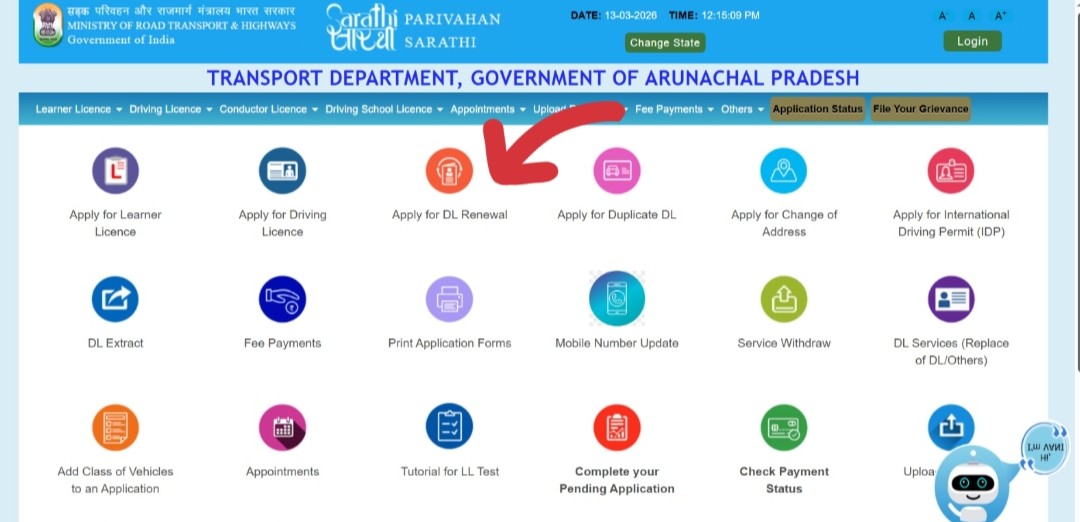 Select Services on Driving Licence and click Continue
 -
4Enter your existing Driving Licence number and Date of Birth, then click Submit. Your current DL details will appear on screen.
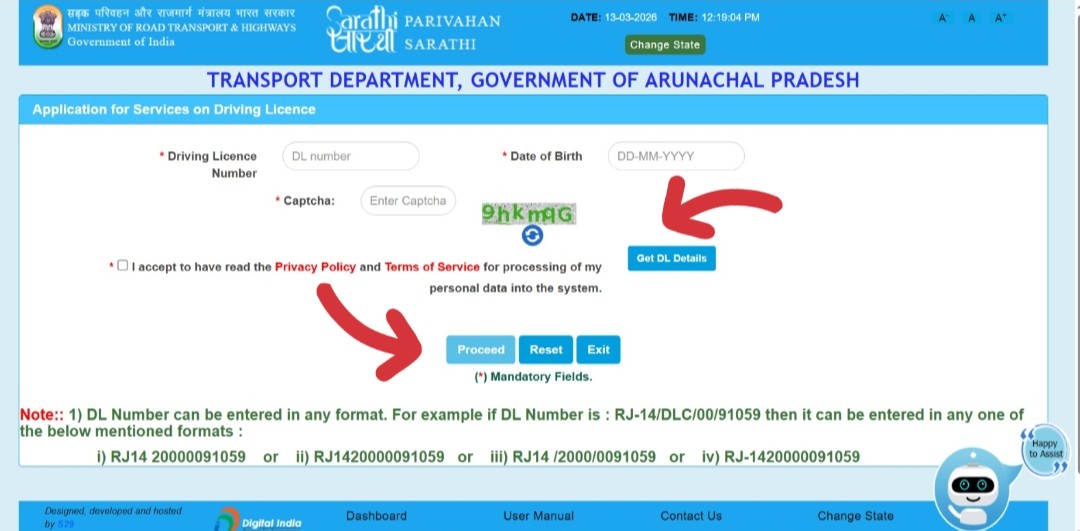 Enter your existing DL number and date of birth, then click Submit
 -
5From the list of available services, select "Addition of Class of Vehicle."
-
6Enter your Learner's Licence number for the new vehicle class. The portal will verify the LL and confirm it is valid and that the 30-day waiting period has been completed.
-
7Upload the required documents including your existing DL, new LL, Form 1 (and Form 1A if applicable), proof of identity, proof of address, and photograph.
-
8Pay the application fee online (see fee table below). Save the payment receipt — this is your proof of application.
-
9Book your driving test slot at your nearest RTO. Select a convenient date and time from the available slots on the calendar.
-
10Download and save your acknowledgement slip with the application reference number. You will need this on the day of the driving test.
Step 3 — Book and Pass the Driving Test
Just like when you got your original permanent DL, you must pass a practical driving test at the RTO for the new vehicle class. There is no written test for the addition — only the practical skills test.
What to Carry on Test Day
- Acknowledgement slip / appointment slip
- Original existing Driving Licence
- Original Learner's Licence for the new class
- Original Aadhaar Card or government photo ID
- Application fee payment receipt
- Form 1 (and Form 1A if above 40 or transport class)
- The vehicle for the test — matching the new class (e.g., car for LMV, motorcycle for MCWG). Must have valid insurance and PUC.
What the Test Involves
A Motor Vehicle Inspector (MVI) at the RTO will assess your ability to drive the new vehicle class. The test typically checks:
- Basic vehicle control — starting, stopping, turning, gear changes
- Reversing and parking manoeuvres
- Driving on a marked test track at the RTO
- Knowledge of basic traffic signals and right-of-way rules (may be tested verbally)
- Vehicle handling at low and moderate speeds
After Passing the Test
Once you pass the practical driving test and the RTO processes your documents:
- The new vehicle class will be added as an endorsement on your existing Driving Licence
- Your updated DL (with the new class) will be dispatched to your registered address by speed post, usually within 2–4 weeks
- You can download the updated digital DL from the Sarathi portal under "Print Driving Licence" once the addition is processed
- Your DL number remains the same — only the list of authorised vehicle classes changes
Fees Breakdown
All fees are paid online at the time of application. Fees vary slightly by state but the following are the standard MoRTH rates:
| Service | Standard Fee | Notes |
|---|---|---|
| LL Issuance (new class) | ₹150 | For getting the LL for the new vehicle category |
| LL Test Fee | ₹50 | Usually waived if you already hold a DL (exempted from test) |
| Addition of Class Application | ₹300 – ₹500 | For applying via Services on DL; varies by state and class |
| Smart Card DL Fee | ₹200 | For the updated physical smart card dispatch |
| Driving Test Fee | ₹50 – ₹300 | Per vehicle class; varies by state |
| Transport Vehicle Badge | ₹200 – ₹500 | Only for commercial/transport vehicle class addition |
How Long Does the Entire Process Take?
Here is a realistic timeline from start to having your updated DL in hand:
| Stage | Time Required | Notes |
|---|---|---|
| Apply for LL (new class) | 1–2 days | Instant if online; same day if all documents are ready |
| LL test / issuance | Immediate | DL holders are typically exempt from the LL knowledge test |
| Mandatory 30-day LL waiting period | 30 days | Cannot skip — the law requires 30 days of holding the LL |
| Apply via Services on DL | 1 day | Online application takes 30–60 minutes if documents are ready |
| Get driving test slot | 3–14 days | Depends on slot availability at your RTO |
| Practical driving test | 1 day (RTO visit) | The test itself takes 15–30 minutes at the RTO |
| RTO processing | 3–7 days | After passing the test and document verification |
| Updated DL dispatched by post | 7–21 days | Speed post delivery after printing |
| Digital DL available | 2–5 days after test | Downloadable from Sarathi portal / mParivahan once processed |
Common Errors and Fixes
Your DL record may not be migrated to the Sarathi digital system by your RTO, or you may have selected the wrong state.
You are trying to apply for addition of class before the mandatory 30-day wait after obtaining the LL.
If your LL expires (valid for only 6 months) before you complete the addition process, the application cannot proceed.
Some states have state-specific portals or offline-only processes for certain DL services.
File size too large, wrong format, or browser compatibility issues are the most common causes.
Frequently Asked Questions
Yes, but it is better to renew your DL first and then apply for the addition. If your DL expires during the addition process, it can create complications. Renew it, then start the addition process.
For the Learner's Licence stage: since you already hold a permanent DL, you are generally exempt from the LL knowledge test in most states. You still need to pass the practical driving test at the RTO for the new class.
You can add multiple classes in one application if you have valid Learner's Licences for all of them. However, you will need to pass a separate practical driving test for each vehicle class at the RTO.
There is no general exemption from the practical driving test. All applicants adding a new vehicle class must pass the test at the RTO. However, DL holders are typically exempt from the written/knowledge test at the LL stage.
No. Your DL number stays exactly the same. The new vehicle class is added as an endorsement on the existing licence. The physical card is reprinted and dispatched with the updated class list.
Once the addition is processed by the RTO and appears on the Sarathi portal, you can download the updated digital DL and use it via mParivahan or DigiLocker. This digital version is legally valid. You do not need to wait for the physical card to start driving the new vehicle class.
The application must be processed at the RTO linked to your original DL. If you have moved states, you may need to first apply for a Transfer of DL to your current state, then apply for the addition. Check with your local RTO for the specific process.
The LL issued for adding a new vehicle class is valid for 6 months, the same as a standard LL. You must complete the addition process (including passing the driving test) within this 6-month window.